Docker: Accelerated Container Application Development
Docker is a platform designed to help developers build, share, and run container applications. We handle the tedious setup, so you can focus on the code.
www.docker.com

1. window 기반의 노트북 - 저전력 노트북이 아니기 때문에 AMD64로 다운
2. Docker Desktop 실행

3. Mac은 터미널에서 윈도우는 윈도우 파워셀 접속

4. 해당 경로에 새로운 파일 만든 다음 명령어 입력(파일명/위치는 자유, 명령어에 위치만 잘 입력하면 됨)
이 과정은 docker 환경 Jupyter로 설치+접속하는 과
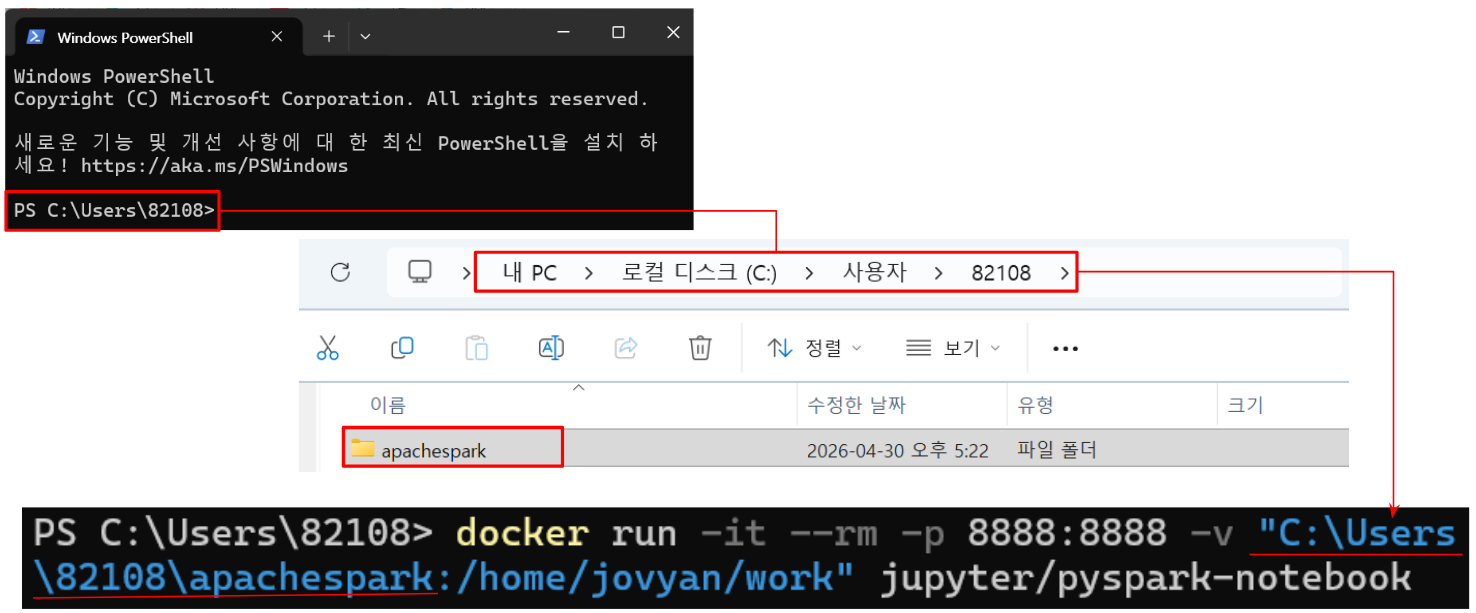
docker run -it --rm -p 8888:8888 -v "C:\Users\82108\apachespark:/home/jovyan/work" jupyter/pyspark-notebook5. 해당 링크로 들어가면 Jupyter로 접속

5-1. 터미널로 직접 docker 접속

6. 파일을 왼쪽에 드래그해서 원하는 파일 열기

# RDD 만드는 방법

import pyspark

# class pyspark.SparkContext (
#    master = None,
#    appName = None,
#    sparkHome = None,
#    pyFiles = None,
#    environment = None,
#    batchSize = 0,
#    serializer = PickleSerializer(),
#    conf = None,
#    gateway = None,
#    jsc = None,
#    profiler_cls = <class 'pyspark.profiler.BasicProfiler'>
# )

# Master − It is the URL of the cluster it connects to.
# appName − Name of your job.
# sparkHome − Spark installation directory.
# pyFiles − The .zip or .py files to send to the cluster and add to the PYTHONPATH.
# Environment − Worker nodes environment variables.
# batchSize − The number of Python objects represented as a single Java object. Set 1 to disable batching, 0 to automatically choose the batch size based on object sizes, or -1 to use an unlimited batch size.
# Serializer − RDD serializer.
# Conf − An object of L{SparkConf} to set all the Spark properties.
# Gateway − Use an existing gateway and JVM, otherwise initializing a new JVM.
# JSC − The JavaSparkContext instance.
# profiler_cls − A class of custom Profiler used to do profiling (the default is pyspark.profiler.BasicProfiler).

# SparkContext uses Py4J to launch a JVM and creates a JavaSparkContext.
# By default, PySpark has SparkContext available as ‘sc’, so creating a new SparkContext won't work.

sc = pyspark.SparkContext('local[*]')

# RDD : immutable distributed collection of objects
rdd = sc.parallelize(range(1000))
rdd.takeSample(False, 5)- sc = pyspark.SparkContext('local[*]') 에서 인자가 하나라는 건 master값으로 할당, 두개면 master랑 appName 할당
- 한번 만들어진 RDD는 수정 불가
- sc = pyspark.SparkContext('local[*]') : 환경 설정 - spark의 엔진을 내 컴퓨터(local)의 모든 자원을 사용해 가동
- rdd = sc.parallelize(range(1000)) : 데이터 분산 - 메모리에 있는 일반 파이썬 리스트를 spark가 관리하는 분산 데이터(RDD)로 만드는 과정
- rdd.takeSample(False, 5) - 전체 데이터 중 중복 없이(False) 임의의 데이터 5개 뽑아서 드라이버로 가져옴
'IT 정리 > 아파치 스파크' 카테고리의 다른 글
| Spark 기초(1) (0) | 2026.05.01 |
|---|---|
| Spark 환경 설정 (0) | 2026.04.30 |
| RDD, Docker 소개 (0) | 2026.04.30 |
| 클러스터&스파크 아키텍쳐 소개 (0) | 2026.04.30 |
| 아파치 스파크 소개 (0) | 2026.04.30 |